Our Sponsers

Showing posts with label Google+. Show all posts

Thursday, July 19, 2012

How to get Adsense Account quick and easily ? -Updated

Rounaj | 7:52 AM | | | |
0 comments
Hey..How are you all ?? As u know Adsense is one of the most well known reason for blogging.. While one starts blogging for his/her passion about it ; after some days or months it has to become a source of a income.. And while one talks about making money by blogging .. Adsense must come into the top place for it.. But the most disappointing thing is a major part of a blogger does not gets Adsense approval for some reason like "Unacceptable Site content" etc. And after the disapproval of it the other remaining option are far away from Adsense as they dont deliver good quality ads or dont payout on time or for other reason..

Also checkout :- How to send Msg from FB to any number easily and free?

So What to Do Now !?!?

So now as blogging is becoming more and more popular in this days we have to think about other option.. And the other options should not be choosing other Ads than Adsense.. It must be to get approved for Adsense..

How to Get Easily Approved for Adsense ?

If are a daily reader of our blog then u must see that We dont serve Adsense ads..So what u are thinking of is How can We say about easy Adsense approval !! So here is the big news.. Yesterday We got approved for Adsense by doing just a easy but effected trick..

I cant wait .. Plz Tell me the Trick..

Yah..Yah..Here we go.. Just follow the following steps for it...

  • At first create a new mail id. (U will need it obviously ..:p) 


  • Find a website already running Adsense for atleast a month without any problem and also find it's owner.. (For finding it's owner u can go to whoisdomain eassily).. U can also ask any of ur friend having any an Adsense activated site..

  • Now just convene him/her that u will just use his'her domain name to activate ur Adsense account.. 
  • After that just fill the Adsense form with ur new mail id and ur friend's site..

  • Now just wait for 1-2 day for getting a mail from Google that your site is partiality reviewed ..
  • Now just go to ur Adsense account and get ur ad code and tell that site admin / ur friend to add that code to him/her site..

  • Now u r done.. just go to bed and relax.... Just wait for some day (Should be in 3-4 days) and U should get a mail from Google that "Welcome to Adsense" ..


Now why are you waiting ?? It should be your most happening day if u r a blogger...Now just Be Fresh Be Geek ...

Friday, March 23, 2012

Blogger Introduced new Easy to Use SEO Option

Rounaj | 7:12 AM | | | |
0 comments
Hey..Here is a real good news for blogger... Many people left blogger to WordPress because blogger does not have customizing SEO part.. But Yesterday blogger has introduced New “Search Preferences” Option by which a blogger blog can be customized with SEO part like Meta Tags, Customize Robots.txt, Redirects, Customize 404 Error Page option, Alt tags for Images etc.. So from now a blogger blog will be fully supported by Google SEO service..

The Added Preferences Are :-

  • Meta tag Description
  • Individual Meta tags for each blog post 
  • Custom 404 not found error page
  • Custom Redirects for any blogger page
  • Custom robots.txt
  • Custom robots header tags
  • Custom and easy to add Alt and Title tags for Images             

How to Enable This ?

  This Easy to handle options are available for every new New Blogger UI Dashboard. So to enable This Option just Visit New Blogger Dashboard > Select the Blog
Select the Settings Tab > Search Preference ...

Seo, Blogger, Easy to Use

MetaTag Description :- 

This is a short Meta description for your blog... It should be short, well served and in between Maximum 150 Characters in Length.
* It will be visible on Search Results of Home page.*

Meta , Blogger, Blog, Seo

MetaTag for Each Post :-

Here is the Custom Post Meta Description for Each and Every Individual Post. You can Set and Customise the Each Post Description While Creating or Editing the post area.
To do it Under the Post Settings (Right side of Creating/Editing Post) Click the Search Description. Enter the Small Description about your Post.There is no limit of letters but as Google crawls only 160 characters you should keep this description as short as you can...

Meta Tag, Blogger, SEO, Blog

Custom 404 Message :-

So bye bye old and boring Google's default 404 error page.. Now you can customise your own 404 error message for your blog as yours.. The most interesting thing is you can easily add any image or message also..

404, error, customised, blogger, seo

Preview :-


Custom Redirects :-

Here is another awesome feature as from now you can easily redirect any of your blog page to another.. This uses 302 temporarily redirect method for redirect.

Redirect, 302 Redirect , Blogger, Seo

Custom "Robot.TxT"

Usually every website has a robots.txt. You can access the robots.txt file using the url http://yourwebsite.blogspot.com/robots.txt..
By "Robot.txt" file we can easily block or allow search engines to crawl our website. But before this Google does not allowed us to edit this.. But from now We can Edit This..
**Note- By changing this without knowing what it is can be harmful for your blog **

Robot.txt, Blogger, Custom, SEO

Custom Robots Header Tag :-

This is Robot tags to Control the Search Engine Robots. This Tags are usually set in (X)HTML Pages OR sent through HTTP Headers to Allow or Block the Robots.
**Plz do not change it without having any idea**

Robot, Header Tag, Blogger, SEO

Custom robots header tags for each Post :-

These are the Custom Robots Header Tags for Each and Every Individual Post. These are also sent through HTTP Header.
You can customise the Custom Robots Header While Creating OR Editing Post.

Robot, Post, Blogger, SEO

Alt tags and Title for Images :-

This is the last but not the list feature by google.. Before this we have to edit blog's picture's alt tags or title tag by going to HTML Editor.. But From now you will be able to do this easily in post Creating Page..

alt tags, title, blogger image, seo
So... What's more ?? Just stay free .. stay cool..

Tuesday, January 31, 2012

Blog Update:- Blogspot.com Becomes Blogspot.in !!

Rounaj | 7:09 AM | | | |
0 comments
blogger,blogspotBad News for blog spot users.. It is looking like every blogspot.com domain is redirecting to blogspot.in domain.. I mean if your website's Address is mysite.blogspot.com .Then it will be now redirect to mysite.blogspot.in .. This is not official yet.. I mean there is no official post from Google Blogger.. It is also not known that is only blogs from India will be redirected to blogspot.in or every site from any country will be redirected.. So Nothing is confirmed yet.. But at this moment every blog having blogspot.com domain is now redirecting to blogspot.in Domain..

Why is This Not Good For any Website ?

Nothing is gonna be bad as Google is doing this.. But what will be the Google Page ranking and Alexa Page ranking status.. By this every blog having no Customized Domain will loose thier important Page Ranking by Several 3rd party sites.. Search Engine will be also effected by this.. But there is only one hope that the web Giant Google is doing this.. So lets be cool keep praying that Everything goes Normal.. Till Then Be Fresh Be geek..

Saturday, January 21, 2012

Black Outed Sites Allover the net on 15th Jan

Rounaj | 9:34 AM | | | |
0 comments
blackout,wiki,google,torrent,other sitesSites around the world, including Wikipedia, Google, Reddit, WordPress, Firefox and Wired, blacked out their sites or portions of their sites, in a protest against the Stop Online Piracy Act and Protect Intellectual Property Act being considered in the U.S. Congress. The SOPA Strike, coordinated at sopastrike.com, was dominated by sites based in the USA, run between 8AM EST and end at 8PM EST.
Wikipedia blacked out their site for 24 hours, providing a page with the heading, “Imagine a world without free knowledge”. Read on to see how other sites joined in the protest.

Wikipedia SOPA PIPA Blackout protest


Google blacked out its name on the search page. Clicking on the black box took users to information about why Google opposes SOPA.

Google SOPA PIPA Blackout protest

WordPress.org blacks out all recent posts.

Wordpress SOPA PIPA Blackout protest

Wired blacks out everything except for the three words, “Why Censored Wired”, and offers an option to “uncensor this page”.

Wired SOPA PIPA Blackout protest

Reddit states, “SOPA and PIPA damage Reddit. Today we fight back.”

Reddit SOPA PIPA Blackout protest

Cheezburger informs visitors that the site “needs your help”.

Cheezburger SOPA PIPA Blackout protest

Firefox takes an informative approach to the online strike.

Firefox SOPA PIPA Blackout protest

Bit Torrent site TorrentFreak gives visitors a choice, “Save the Internet” or “Meh”.

TorrentFreak SOPA PIPA Blackout protest

IMGUR, the Simple Image Sharer, informs us that the internet is on strike.

Imgur SOPA PIPA Blackout protest

MLG (Major League Games) takes a minimist approach.

MLG SOPA PIPA Blackout protest

Minecraft company Mojang says, “PIPA and SOPA? How about NOPA!”

Minecraft SOPA PIPA Blackout protest

Activist movement Moveon.org invites visitors to sign the petition. “The government must not be allowed to censor the Internet at the request of powerful lobbyists. Say NO to Internet censorship.”


Moveon SOPA PIPA Blackout protest

Gizmodo brings in the image of corporate bully Smithers from The Simpsons.

Gizmodo SOPA PIPA Blackout protest

CEA (Consumer Electronics Association) called for visitors to stand up for innovation.

CEA SOPA PIPA Blackout protest

Bit Torrent site Demonoid faded out content, acknowledging the impact SOPA and PIPA would have on the site.

Demonoid SOPA PIPA Blackout protest

Dinosaur Comics placed a red censored notice over content.

Dinosaur Comics SOPA PIPA Blackout protest

Aljadeed television broadcasting site joined in, with links to Wikipedia, Google and fightforthefuture.org/pipa.

Aljadeed SOPA PIPA Blackout protest

Ars Technica designed a special banner promoting SOPA Resistance Day.

Ars Technica SOPA PIPA Blackout protest

BoingBoing produced a 503 message, inviting visitors to sign a petition.

BoingBoing SOPA PIPA Blackout protest

Craiglist produced a simple message, naming corporations who were likely to benefit from the crackdown.

Craigslist SOPA PIPA Blackout protest

Social game producer Zynga released images featuring Words With Friends, Hanging With Friends and Scramble, spelling out the company’s stance on SOPA.

Zynga Hanging With Friends SOPA PIPA Blackout protest
Zynga Words With Friends SOPA PIPA Blackout protest
                                                                                                                   Source:- Inspiration Room
Now on Today Sopa,The Us Congress has to move back.. So there is no danger of damaging the free web by Stop Online Piracy Act... So now Be geek... Be Fresh..

Friday, January 20, 2012

Visit Wikipedia offline

Rounaj | 2:36 AM | | | | | |
0 comments
wiki,offileYah... This could seemed like fairy tale but this is really true .. There is several Google Chrome AddOne by which you can eassily save the whole wikipedia in your computer !! One of this and the most Popular One is "Offline Wiki" ..This application saves and downloads a copy of nearly all of the textual content of the English Wikipedia locally so that it can be accessed without internet connectivity. It downloads and saves a compressed dump file and an index, 14MB for the small version and 1GB for the larger one (you can select which one from the settings). So below is the process how to get it..

Step 1.
Open Google Chrome or Download it from here and sign in to your google account (Important) ..

Step 2.
Visit here to download the Chrome extension..

Download, Offline wki

Step 3.
After Installing the App Launch it..

launch,Offline Wiki

Step 4.
It will open a new page.. Where you have to give that AddOne a permission to save files feom wikipedia Automaticly..

permission, Offline Wiki

Step 5.
Thats it.. It will Download the whole wikipedia automaticly...

download,save,wikipedia

Thursday, January 19, 2012

How to Search Google Without Internet Via SMS

Rounaj | 12:52 AM | | | |
0 comments
Sms,Google,Without Internet,SearchAt this point SMS is the most preferable service in between all the variety of mobile usage for communication .. At if we have to choose the best from internet EveryOne would choose the web Gaint GOOGLE . But people believe that Google Service is only available with a net-conection.. But the truth is not.. Recently Google has again introduce us with a great service to search query from Google by just sending a msg to Google Server !! Yah.. It is true.. This new service gives all movie show times ,Locations of local businesses ,Word meanings ,weather forecast ,Product prices and much more. So by this service you dont have to waste your money on Mobile Data plans to though they are now in everyone's estimate.. 

So Here is how it is Done--
  • India users can send their queries at  : 9773300000
  • USA users can send their queries at : 466453
 Here is Some Common Sample to Use this Service--
  • To Get Movies Shows -->>> Movies Mission Impossible 4
  • To Get Web Snippets -->>> Web HackingUniverse
  • To Get the Meaning of a Word -->>> Define Hacking
  • T0 Get Sports News -->>> Score India vs Australia Cricket
  • To Get Stock Updates --->>> Stock Tgt

Friday, December 9, 2011

How to Download books from Google in PDF

Anonymous | 11:47 PM | | |
0 comments
If you want to know if their is a way to download books from Google then you come to the right place. Their are a couple of ways to download books from Google. You can either use programs, browser add-on's, and are simply using your skills and knowledge of html and viewing the source. Most ways are difficult but we've provided a descent way for newbies to get the hang of doing so.

If you'll like to download load books as PDF from Google Books then continue reading below.

books_logo_lg

Download Books From Google Books

Like I have said there are numerous of ways one can download books from Google Books. Below are the different ways, pick the method that works best for you.

Browser Add-on's

  • If you are using Firefox!
  • Install the Grease Monkey Add-on for Firefox.
  • Once you have installed Grease Monkey install the Google Books Down-loader script.
  • Restart your browser and you should see an option to download any book.
  • [Optional] You can also use Down Them All  

  • If you are using any other browser unfortunately there is no better option then with the above method. 

Programs

Hopefully this provided information works well for you guys. If we missed something please recommend it in the comments.

Friday, December 2, 2011

Get New Google Bar Right Now Before Official Release

Anonymous | 9:21 AM | |
0 comments
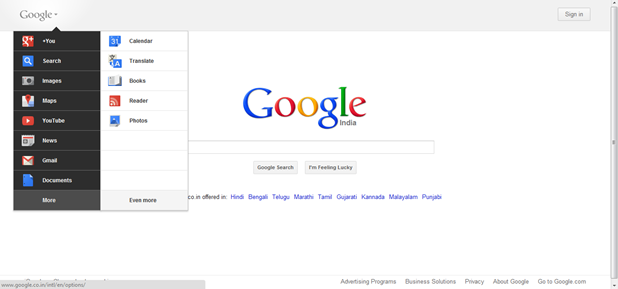
Google is tweaking every part of their services in layout and design so that they are more productive in using and easy for customization so they started from Blogger and than today they changed YouTube.com design entirely so their were some great plans from Google to tweak their official homepage to new style so that its much more productive in use. So if you don’t know what new Google Bar really looks like you can check the preview below.

Get New Google Bar Right Now Before Official Release
So now this is officially released in some countries and maybe you would also be seeing this thing on Google Homepage but if you are not able to view this Google Bar and wanted to enjoy this one than for Chrome we have a simple solution which you can use to enjoy this amazing Google Bar.

Follow Below Steps .:

1. So in Chrome Browser install Cookie Editing Extension.
2. Now after installing extension go to Google.com and than click on the Cookie Icon in the status bar.
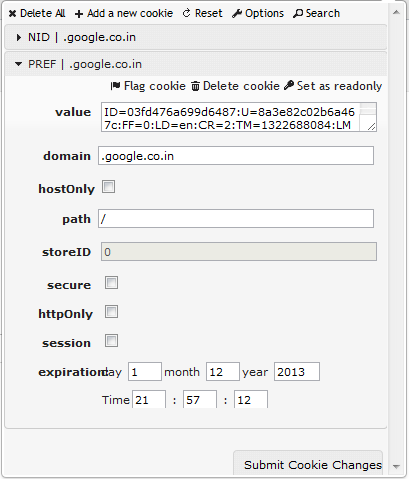
3. Now if will open a small dialog, navigate to PREF > Value > Now replace the Value with below code .: ( Click below code to copy it from online text file.)

ID=03fd476a699d6487:U=88e8716486ff1e5d:FF=0:LD=en:CR=2:TM=1322688084:LM=1322688085:S=McEsyvcXKMiVfGds

Get New Google Bar Right Now Before Official Release
4. Now click on Submit Cookie Changes and than refresh the Google Homepage and Voila !, you have the New Google Bar right in front of you which you can enjoy.